Human in the Loop AI Automation: Where Approval Gates and Audit Logs Matter
Learn where AI automation should act automatically, where humans should approve, and how confidence, audit logs, fallbacks and rollback improve reliability.

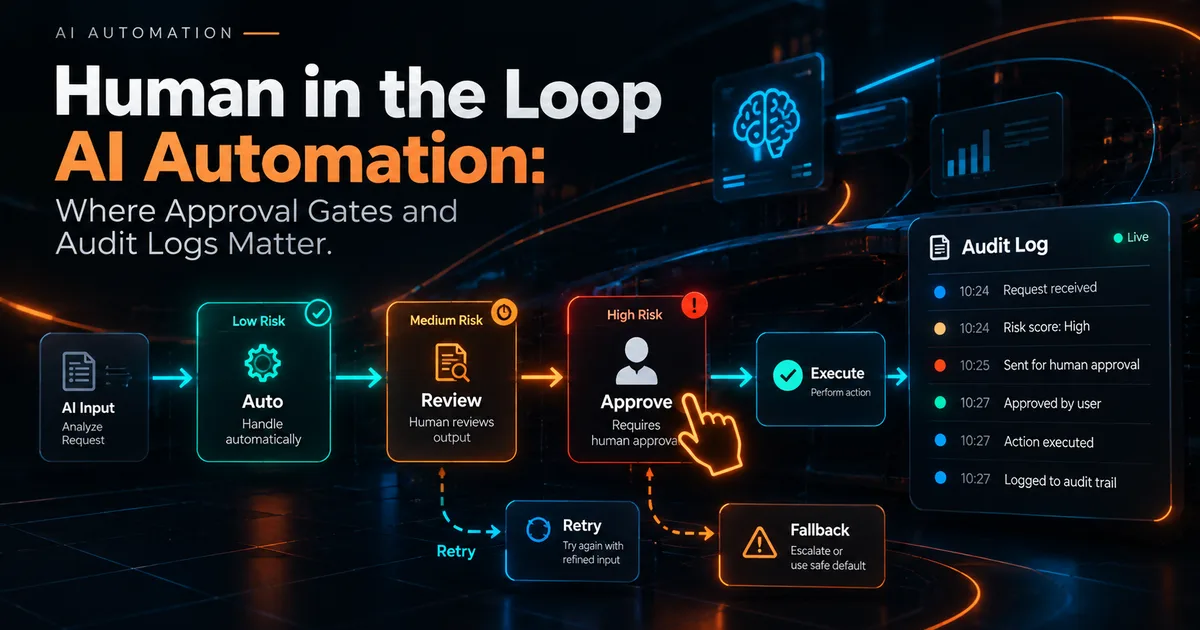
The most useful AI automation systems are not the ones that remove humans from every step. They are the ones that know which steps are safe to automate and which steps deserve review.
A human in the loop design places approval, review or escalation at specific points in a workflow based on risk, confidence and reversibility.
Classify actions by consequence
Start by sorting actions into three classes.
Low consequence
Examples:
- Classifying a lead by service interest.
- Drafting an internal summary.
- Suggesting a task title.
- Extracting fields from a document for review.
These can often run automatically with monitoring.
Medium consequence
Examples:
- Drafting a client email.
- Updating a CRM stage.
- Recommending a bid change.
- Creating a proposal outline.
These may be automated when confidence is high, but a preview or reversible action is valuable.
High consequence
Examples:
- Sending sensitive outbound communication.
- Deleting customer data.
- Issuing refunds.
- Changing permissions.
- Publishing legal or financial claims.
These should usually require explicit authorization and strong auditability.
Use approval gates where information is incomplete
An AI model can produce a fluent answer even when the source data is incomplete.
Before a high impact action, validate prerequisites.
Example outbound email gate:
- Contact identity confirmed.
- Business context available.
- Opt out state checked.
- Message reviewed for unsupported claims.
- Correct sender account selected.
- Final action logged.
The approval screen should show the evidence the model used, not only the final draft.
Confidence is a routing signal, not truth
Model confidence should not be treated as a guarantee of correctness.
A useful workflow can combine several checks:
- Is required source data present?
- Did deterministic validation pass?
- Is the output structurally valid?
- Does the action fall into a restricted category?
- Has a similar task failed recently?
Low confidence or failed validation should route the task to review.
Make every automated action attributable
An audit log should answer:
- What happened?
- When did it happen?
- Which workflow initiated it?
- Which model or rule produced the recommendation?
- What source data was used?
- Who approved it, if approval was required?
- What changed as a result?
The log should be useful during debugging, not merely stored for appearance.
Preserve the original input
If a model summarizes or transforms data, keep a reference to the source.
For example, an AI generated CRM note should not replace the original call transcript or message. Store the summary as a derived artifact with a link to the source record.
This makes mistakes recoverable.
Design fallbacks before launch
Every automation needs a failure path.
If an API times out, should the workflow:
- Retry?
- Queue the task?
- Assign it to a person?
- Skip the optional enrichment step?
- Stop the entire transaction?
The answer depends on whether the step is critical.
A lead intake workflow should not lose a valid lead because an enrichment API is unavailable.
Make actions idempotent
Retries are normal in distributed systems.
An idempotent action can run again without creating unintended duplicates.
Examples:
- Do not create a second follow up task if one already exists.
- Do not send the same welcome message twice for the same event.
- Use an external transaction ID when creating records across systems.
- Store the last processed event identifier.
This is one of the most important differences between a demo automation and a production automation.
Human review should be efficient
A review queue that requires five minutes per item will become a bottleneck.
Design the review screen so the person can see:
- The proposed action.
- The important source context.
- Why the item was escalated.
- The editable fields.
- Approve, reject or revise controls.
Capture the reason for rejection when useful. Those reasons can reveal rules that should be added to the workflow.
Use policy rules before model judgment
Some decisions should be deterministic.
Examples:
- A user without permission cannot access a recording.
- A contact with an opt out flag cannot enter a marketing sequence.
- A refund over a defined amount requires manager approval.
- A record cannot be deleted while a retention hold is active.
Do not ask a language model to decide whether a hard business rule applies when code can enforce it directly.
Monitor outcomes, not only workflow success
A workflow can complete successfully and still produce poor outcomes.
Track:
- Approval rate.
- Rejection reasons.
- Manual correction rate.
- Duplicate action rate.
- Failure and retry rate.
- Time saved per accepted action.
- Customer complaints or reversals tied to automation.
If humans consistently rewrite the same field, the automation needs improvement.
Example: AI assisted lead qualification
A robust flow could look like this:
- Lead submits a form.
- Deterministic validation checks contact fields.
- AI summarizes the company and stated need.
- Rules verify required information.
- AI suggests service category and urgency.
- Low confidence leads enter a review queue.
- Approved classification triggers routing.
- The owner receives the original lead data plus the AI summary.
- Every decision is logged.
AI supports the process without becoming the only source of truth.
Example: AI assisted outreach
A safer outreach workflow separates drafting from sending.
- Gather public business context.
- Generate a personalized draft.
- Check claims against source data.
- Apply communication rules.
- Review high value or ambiguous messages.
- Send through the approved channel.
- Record the exact message and delivery result.
- Stop follow up when a reply or opt out arrives.
For simpler automation ideas, see AI Automation for Small Business.
Final checklist
Before allowing AI to take an action, ask:
- Is the action reversible?
- What happens if the model is wrong?
- Does a deterministic rule cover this decision?
- Is the source context available for review?
- Can the action safely retry?
- Is there an audit trail?
- Is there a fallback when an integration fails?
- Can a human intervene without rebuilding the workflow?
The goal is not maximum autonomy. The goal is reliable autonomy where the cost of being wrong is understood and controlled.
Co-Founder of Strat IQ Digital and builder of CrawlerQue and Stratly Digital, based in West Palm Beach, FL. I work on AI products, SaaS, SEO intelligence, CRM automation and growth systems.