JavaScript SEO in 2026: Rendering, Crawlability and Indexing for React and Vite Sites
A practical JavaScript SEO guide for React and Vite websites covering rendered HTML, crawlable links, status codes, metadata, lazy loading and debugging.

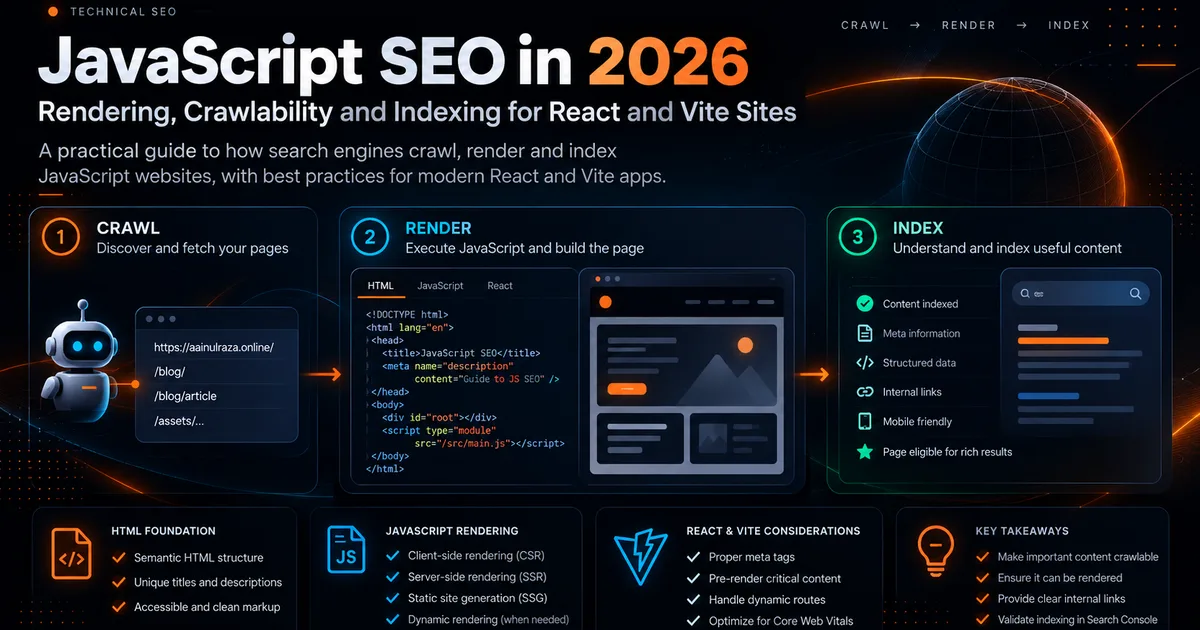
Modern front ends can create excellent user experiences and still create avoidable search problems. The risk is not that Google cannot run JavaScript. Google can render JavaScript with a modern Chromium based renderer. The risk is that important content, links, status codes or metadata may only become available after extra work, fail under an error condition, or be invisible to crawlers that do not execute JavaScript in the same way.
Google describes JavaScript processing in three broad stages: crawling, rendering and indexing. That makes the practical goal simple: make the important meaning of a page available as early and reliably as possible.
Google's JavaScript SEO documentation is the primary reference for the technical behavior described in this guide: Understand JavaScript SEO basics.
Start with what the initial HTML contains
Open a production URL and compare three views:
- View Source in the browser.
- The rendered DOM in DevTools.
- The rendered HTML shown by Search Console URL Inspection or Google's Rich Results Test.
If the page title, main heading, article text, canonical URL and important internal links only appear after a chain of client side API calls, your architecture has more failure points than necessary.
This does not mean every React application must be converted to a server rendered framework. It means that pages intended to rank should expose stable, meaningful HTML wherever practical.
For a marketing site or content site built with Vite, static generation is often a strong fit. The final HTML can already contain the page content, while JavaScript adds interaction after load.
The rendering risk model
Think about JavaScript SEO as a dependency graph.
A page becomes fragile when search visibility depends on several things all working in sequence:
- The JavaScript bundle must download.
- The bundle must execute without an exception.
- An API must respond.
- Authentication or cookies must not block the content.
- A component must mount.
- Links must be inserted into the DOM.
- Metadata must be updated correctly.
The more steps between the HTTP response and the real content, the more opportunities exist for partial rendering.
Google recommends server side rendering, static rendering or hydration rather than treating dynamic rendering as a permanent workaround. See Dynamic rendering as a workaround.
Make internal links real links
Navigation should use crawlable HTML links with an href attribute.
A clickable div with a JavaScript handler may work for a person but provides a weaker discovery path for crawlers. For important navigation, category pages, related articles and product pages, use normal anchor elements.
A useful audit is to disable JavaScript and inspect whether the page still exposes meaningful navigation. The interface does not need to remain fully interactive. The point is to see whether the site's information architecture survives.
This is especially important when building topic clusters. See Internal Linking for AI Search for a deeper linking framework.
Use meaningful status codes
Single page applications often create an SEO problem when every URL returns 200 OK, including URLs that do not exist.
A user sees a custom not found message, but a crawler sees a successful response. This can create soft 404 behavior and waste crawl attention.
For public pages:
- Existing content should normally return
200. - Permanently moved pages should return an appropriate redirect.
- Missing pages should return
404or410where appropriate. - Server failures should not masquerade as successful content pages.
Google specifically recommends meaningful HTTP status codes in its JavaScript SEO guidance.
Keep critical metadata deterministic
Every indexable page should have a unique and descriptive title, meta description and canonical URL.
You can set these with JavaScript, but server or static output is easier to validate and less dependent on runtime behavior. Canonicals deserve extra care. A canonical in the initial HTML should not later be changed by JavaScript to a conflicting value.
For a generated blog, a predictable build step is useful because it can produce the title, description, canonical, Open Graph metadata, article structured data and sitemap from one source of truth.
Do not hide important content behind interaction
A common design pattern loads important content only after a click, scroll threshold or user event. That may be fine for secondary widgets. It is risky for the main text you expect search engines to understand.
For example, an FAQ accordion can visually collapse answers while leaving the text in the DOM. A product comparison should not require a drag gesture before the content exists. A tab interface should not make primary information unavailable until a script runs.
The principle is straightforward: interaction can control presentation without controlling whether essential content exists.
Lazy loading without hiding content
Images below the fold are good candidates for lazy loading. The primary hero image usually is not.
For images:
- Add explicit width and height or an aspect ratio.
- Use modern formats such as WebP or AVIF where practical.
- Lazy load below the fold images.
- Avoid lazy loading the likely LCP image.
- Keep useful alt text tied to the actual image purpose.
For text, avoid custom lazy loading systems that do not expose content until scrolling occurs.
If performance is part of the problem, use the workflow in Core Web Vitals in 2026.
React and Vite specific checks
A Vite application can be very search friendly when the deployment outputs complete HTML pages. Run this checklist against production, not only local development.
Route check
Open a deep URL directly in a fresh browser session. It should load without first visiting the homepage.
Refresh check
Refresh a deep route. If the host returns a generic app shell or an error, routing needs attention.
source check
Use View Source. Confirm the page's unique title, description, canonical and main content are present if your architecture is intended to pre render them.
no JavaScript check
Disable JavaScript. The page does not have to look perfect, but key content and links should still be understandable when possible.
bot rendering check
Use URL Inspection and inspect the rendered page. Google recommends this when debugging JavaScript indexing issues.
Watch third party scripts
A page can be crawlable and still become slow because analytics, chat widgets, advertising scripts, tag managers and animation libraries compete for main thread time.
Prioritize scripts into three groups:
| Group | Examples | Loading approach |
|---|---|---|
| Critical | Navigation logic that users need immediately | Load early and keep small |
| Important | Analytics and conversion tracking | Defer where possible |
| Optional | Decorative effects, secondary widgets | Load after interaction or idle time |
The goal is not zero JavaScript. The goal is intentional JavaScript.
Debugging workflow
When an indexable JavaScript page behaves strangely in Search, use a repeatable process.
- Confirm the URL returns the expected HTTP status.
- Check robots.txt and robots meta tags.
- Inspect the raw HTML response.
- Inspect the rendered DOM.
- Check the browser console for errors.
- Confirm important resources are not blocked.
- Test the page with URL Inspection or Rich Results Test.
- Compare the rendered output with what a user sees.
- Fix the smallest root cause rather than adding a bot specific workaround.
Google's dedicated troubleshooting guide is useful here: Fix Search related JavaScript problems.
A practical architecture rule
For pages whose job is discovery, education or acquisition, prefer an architecture where meaningful content is present before complex interaction begins.
For authenticated dashboards and internal application screens, client side rendering may be perfectly reasonable because those pages are not expected to rank.
The mistake is using one rendering strategy for every part of a product simply because one framework supports it.
Final checklist
Before shipping a React or Vite site, verify:
- Each public page has a unique URL.
- Deep routes work on direct load and refresh.
- Important content is available in rendered HTML.
- Internal links use real anchor elements.
- Missing routes return meaningful error behavior.
- Titles, descriptions and canonicals are deterministic.
- Structured data matches visible content.
- The main image is not accidentally lazy loaded.
- JavaScript errors do not remove important content.
- URL Inspection shows the page you intended to publish.
JavaScript SEO is not about making a site less interactive. It is about making the site's meaning resilient enough that users and crawlers receive the same core information even when the rendering path is complex.
Co-Founder of Strat IQ Digital and builder of CrawlerQue and Stratly Digital, based in West Palm Beach, FL. I work on AI products, SaaS, SEO intelligence, CRM automation and growth systems.