Website Performance Budgets: Control JavaScript, Images, Fonts and Third Party Scripts
Build a practical performance budget for JavaScript, images, fonts and third party scripts so a website stays fast as features and marketing tags are added.

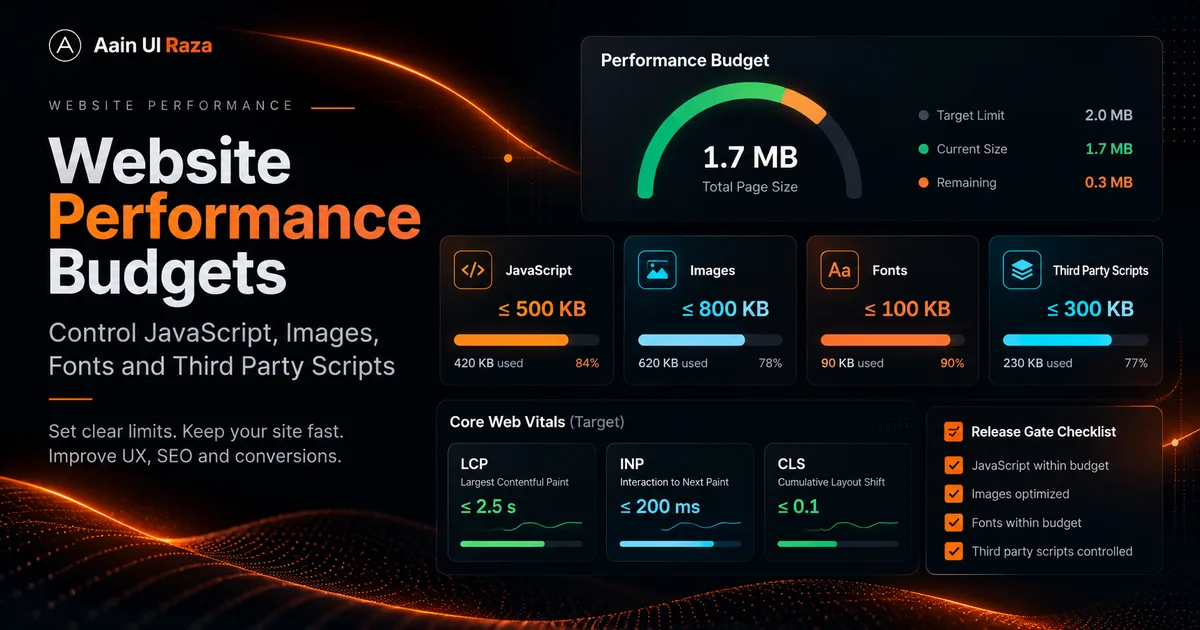
Most websites do not become slow because one developer intentionally ships a slow page. They become slow one reasonable addition at a time.
A new analytics tag looks small. A larger hero image looks better. A chat widget helps sales. A new animation improves polish. A second font creates visual distinction. Six months later, the page is doing too much before the visitor can do anything.
A performance budget turns speed from a cleanup project into a release constraint.
What a performance budget is
A performance budget is a set of measurable limits for the resources and work a page is allowed to consume.
It can include:
- Maximum JavaScript transferred on initial load.
- Maximum JavaScript executed before interaction.
- Maximum hero image size.
- Number of font files.
- Number of third party origins.
- Target LCP, INP and CLS thresholds.
- Maximum total page weight for a template.
The exact numbers depend on the product. The important part is that the limits exist before features are added.
Budget by template, not only by site
A homepage, long article and authenticated dashboard have different jobs.
Create separate budgets for:
Homepage
Fast brand introduction, navigation and primary conversion path.
Article
Text first, one hero image, minimal scripting, stable ad slots when monetized.
Product page
Interactive demos may justify more JavaScript, but core content should remain fast.
Dashboard
Authenticated tools can use heavier client logic, but interaction responsiveness still matters.
This prevents a dashboard's technical needs from becoming an excuse for a heavy blog template.
JavaScript budget
JavaScript is expensive because it must be downloaded, parsed, compiled and executed.
Audit the initial bundle and ask of every major dependency:
- Is it required above the fold?
- Could it be loaded after interaction?
- Is there a smaller native browser feature that does the job?
- Can the feature be disabled on small screens?
- Can the module be split so only the relevant page downloads it?
Decorative WebGL, custom cursors and continuous animation loops are common candidates for delayed or conditional loading.
For search specific JavaScript considerations, read JavaScript SEO in 2026.
Image budget
Images often dominate transfer size.
Set rules such as:
- Hero images have a target maximum size.
- Images are exported near their display dimensions.
- WebP or AVIF is used when appropriate.
- Below the fold images use lazy loading.
- Width and height are declared to protect layout stability.
- Social share images are not automatically used as oversized display images.
One useful pattern is to keep a high quality 1200 by 630 image for Open Graph sharing while serving a compressed WebP version inside the article.
Font budget
Typography can quietly add hundreds of kilobytes and delay text rendering.
Prefer:
- Fewer font families.
- Variable fonts when they genuinely replace multiple static files.
- Only the character sets you need.
font-displaybehavior that does not hide text unnecessarily.- Long lived caching for self hosted fonts.
A brand does not become stronger because every weight from 100 to 900 loads before the first sentence appears.
Third party script budget
Third party scripts are difficult because your team does not control their internal code.
Create an inventory with:
| Script | Owner | Purpose | Load timing | Can remove? |
|---|---|---|---|---|
| Analytics | Marketing | Measurement | Deferred | Maybe |
| Ad script | Monetization | Revenue | Policy dependent | No after launch |
| Chat | Sales | Lead capture | After interaction | Maybe |
| Heatmap | CRO | Research | Sampled | Yes |
If nobody owns a script, that is often a signal to remove it.
Core Web Vitals as outcome metrics
A resource budget is a means. User experience is the outcome.
Track:
- LCP for loading performance.
- INP for interaction responsiveness.
- CLS for visual stability.
Google's current Core Web Vitals guidance is covered in Core Web Vitals in 2026.
Do not chase a perfect laboratory score by deleting useful functionality. Use the metrics to find real friction.
Build a release gate
A budget is strongest when the build process checks it.
Possible checks include:
- Bundle size thresholds.
- Lighthouse CI budgets.
- Image dimension validation.
- Duplicate font detection.
- A list of approved third party domains.
When a pull request exceeds the budget, the team must make a deliberate choice: optimize, remove something else, or approve the tradeoff.
That changes performance from an afterthought into a product decision.
Use mobile as the constraint
A desktop workstation on fast broadband hides problems.
Test on:
- Mid range Android hardware.
- Network throttling.
- A cold cache.
- The actual production build.
- Long articles as well as the homepage.
The slowest meaningful experience is more useful than the fastest demo.
Ads and performance budgets
Once AdSense or another ad platform is introduced, reserve space for ad units so layout does not jump when ads render.
Also account for the additional JavaScript and network activity in your budget. The correct response is not to remove all site functionality. It is to make the base experience efficient enough that monetization does not push the page over the edge.
Google Publisher Policies prohibit pages where ads or paid promotional material exceed publisher content, and a cluttered page can hurt the user experience. Keep the article itself visually dominant.
A sample budget
The following is an example starting point, not a universal standard:
| Item | Example internal limit |
|---|---|
| Initial compressed JavaScript | 180 KB |
| Hero image | 180 KB |
| Initial font transfer | 120 KB |
| Third party scripts before interaction | 3 |
| Unexpected layout shift | None by design |
A highly interactive product may need a different limit. What matters is documenting why.
Monthly performance review
Every month:
- Record current page weights.
- Compare field Core Web Vitals.
- Review new third party scripts.
- Find unused dependencies.
- Check image regressions.
- Test the slowest important page template.
- Remove experiments that are no longer active.
Performance degrades unless someone owns it.
Final checklist
Before adding a new feature, ask:
- How many bytes does it add?
- How much main thread work does it add?
- Does it load on every page?
- Can it wait until the user needs it?
- What happens on a slow phone?
- What existing feature can be removed to pay for it?
- How will we know if it harms LCP, INP or conversions?
A performance budget does not make a website boring. It creates a constraint that forces visual and technical choices to earn their cost.
Co-Founder of Strat IQ Digital and builder of CrawlerQue and Stratly Digital, based in West Palm Beach, FL. I work on AI products, SaaS, SEO intelligence, CRM automation and growth systems.