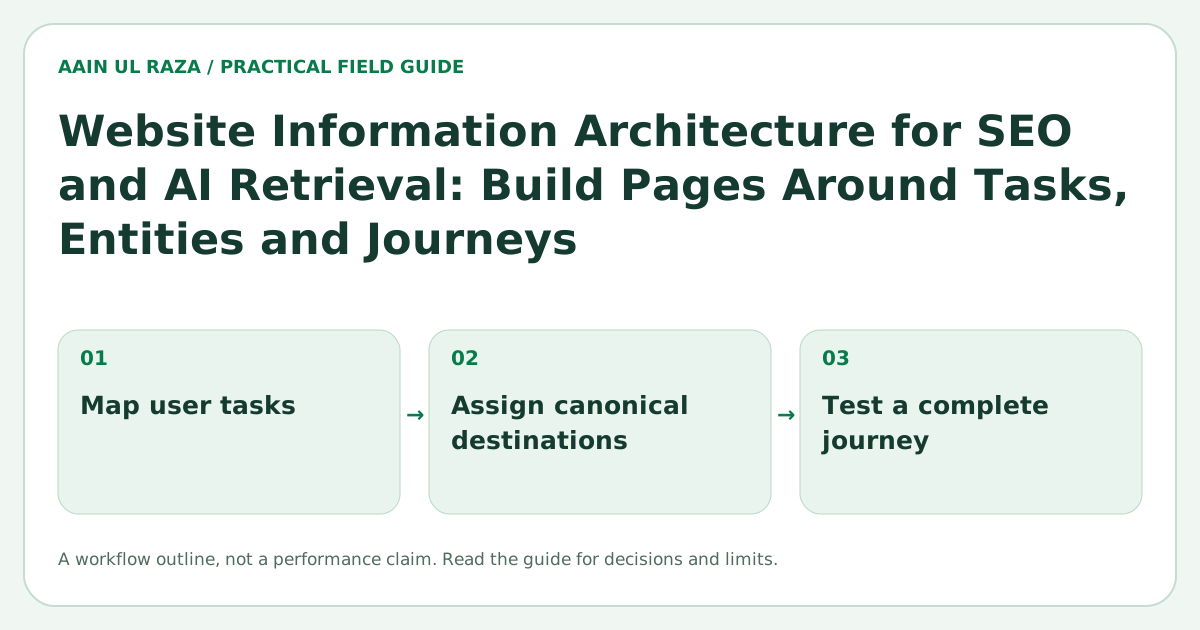
Website Information Architecture for SEO and AI Retrieval: Build Pages Around Tasks, Entities and Journeys
A practical information architecture framework for organizing pages around user tasks, entities, topic relationships and journeys so people, Google and AI systems can understand your site.
Updated · Sources, examples and corrections
A website can publish excellent individual pages and still feel confusing as a whole. The problem is often not the writing. It is the architecture underneath the writing.
Information architecture is the system that decides what deserves its own page, how pages are grouped, which concepts are treated as important entities, how users move between stages of a journey, and how internal links reveal those relationships. When that system is clear, people can find the next useful step quickly. Search engines can discover pages more reliably. AI systems have a cleaner set of relationships to retrieve and summarize.
This guide focuses on a practical architecture for service businesses, SaaS products and expert led websites. The goal is not to build a giant taxonomy. The goal is to build a small number of strong pathways that match real user tasks.
Google's guidance on crawlable links explains that normal anchor links help Google discover pages and understand relationships between them. See Google Search Central: Link best practices. Google also recommends crawlable, stable URL structures in URL structure best practices.
Start with user tasks, not menu labels
A common mistake is to design navigation around internal departments or vague labels. Visitors do not arrive thinking in organizational charts. They arrive with a task.
Examples of tasks include:
- Understand what a product does.
- Compare two approaches.
- Estimate whether a service fits a budget.
- Learn how a technical concept works.
- Fix a problem.
- Evaluate proof before contacting a company.
- Decide what to do next.
For each important task, ask whether the site has a page that can satisfy it without forcing the visitor to stitch together information from several unrelated pages.
A useful architecture normally has three layers:
- Pillar pages that explain the main problem space or offer.
- Supporting pages that answer narrower questions, comparisons and implementation details.
- Action pages that help a visitor contact, sign up, request a demo or start using the product.
The architecture should make the path between those layers obvious.
Build around entities that matter to the business
An entity is a distinct thing that can be described consistently. On a business site, important entities might include the company, founder, product, service, location, customer type, feature, industry or methodology.
Entity clarity matters because a site becomes easier to understand when the same concepts are described consistently across pages.
For example, if a product is called CrawlerQue, the site should consistently connect that name to what the product does, who it is for, which features it contains and which company or founder is responsible for it. If one page describes it as an SEO scanner, another as an AI visibility platform and a third as a marketing dashboard with no connection between those concepts, the site creates unnecessary ambiguity.
A practical entity map can be as simple as this:
| Entity | Core page | Supporting relationships |
|---|---|---|
| Company | About or homepage | Founder, products, services, contact |
| Product | Product page | Features, use cases, pricing, guides |
| Service | Service page | Process, proof, FAQs, related guides |
| Founder | Profile page | Company, expertise, articles, credentials |
| Topic | Pillar guide | Supporting articles, examples, comparisons |
For a deeper entity framework, see Entity SEO in 2026.
Separate discovery pages from decision pages
Not every page should try to do everything.
A discovery page helps someone understand a topic. A decision page helps someone evaluate a product or service. An action page helps someone complete a next step.
Mixing all three jobs into every article often creates weak pages with too many calls to action and not enough depth.
Consider a SaaS product that automates lead routing.
A discovery article might explain how round robin routing works. A decision page might compare routing features and explain ownership rules. An action page might offer a demo or signup. These pages can link to each other, but each page should still have a clear primary purpose.
This approach also improves internal linking because links become meaningful transitions rather than random SEO additions.
Use topic clusters only when the cluster reflects real depth
A topic cluster should not be a folder full of near duplicate keyword variations.
A strong cluster usually contains different information needs. For example, a cluster around AI automation reliability could contain:
- A main reliability guide.
- A human approval guide.
- A retry and idempotency guide.
- A monitoring guide.
- A failure recovery checklist.
- A case study or implementation example.
Each page should answer a different question. If two pages would have almost the same outline, combine them.
This is also why the architecture should be reviewed before publishing a large batch of content. It is easier to prevent cannibalization than to clean it up later.
The Internal Linking for AI Search guide explains how to connect related pages without creating an over optimized maze.
Design a journey, not just a hierarchy
Traditional site maps are usually drawn as trees. Trees are useful, but user journeys often move sideways.
Someone reading a technical article may next want a comparison. Someone reading a pricing page may want proof. Someone looking at a case study may want implementation details.
That means good architecture combines hierarchy with contextual pathways.
A simple journey model is:
Discover → Understand → Compare → Validate → Act
For each important page, identify which stage it serves and what the most useful next page is.
Discover
The visitor is learning the language of the problem. Provide definitions, frameworks and beginner friendly explanations.
Understand
The visitor wants mechanisms, examples and implementation detail. Link to deeper technical or operational pages.
Compare
The visitor wants tradeoffs. Provide comparisons, alternatives, decision criteria and limitations.
Validate
The visitor wants proof. Provide examples, methodology, credentials, case studies, screenshots, benchmarks or references.
Act
The visitor is ready to contact, sign up, request access or use the product.
When the architecture supports this journey, internal links become useful to people and search engines at the same time.
Keep URLs boring and stable
A strong information architecture does not require clever URLs.
Prefer short, descriptive paths that remain stable when the design changes. Avoid building indexable content around fragments or transient query parameters when a normal page can represent the content more reliably.
Examples:
/services/seo//blog/javascript-seo-react-vite-2026//product/features/lead-routing/
The exact folder structure is less important than consistency and stability.
Make important paths crawlable in plain HTML
A visual menu can be animated. A card can have hover effects. A client side app can still feel dynamic. But important navigation should resolve to normal links.
Google's link documentation is explicit that standard <a href="..."> links are the most reliable form for discovery.
For an architecture audit, disable JavaScript and inspect whether the site still exposes its core links. The page does not need to look perfect. You are testing whether the relationship graph survives.
This is especially important for modern React or Vite sites. The JavaScript SEO in 2026 guide covers the rendering side in more detail.
Build internal links around context
An internal link should answer one of three questions:
- What should I learn next?
- Where can I verify this claim or concept?
- What action should I take next?
Avoid generic link blocks that repeat the same anchors on every page. A smaller number of contextual links can communicate relationships more clearly.
For example, an article about AI crawlers can naturally link to robots.txt guidance, llms.txt guidance and AI visibility measurement. That path is meaningful because the concepts are related.
Create an architecture scorecard
You can audit the site with a simple scorecard.
| Question | Good signal |
|---|---|
| Does every important page have at least one crawlable internal link? | Yes |
| Is each page built around a distinct user task? | Yes |
| Are major entities described consistently? | Yes |
| Can a visitor move from discovery to action without returning to Google? | Yes |
| Do supporting articles link back to a relevant pillar? | Yes |
| Are important pages reachable within a reasonable number of clicks? | Yes |
| Are duplicate topic pages merged or differentiated? | Yes |
| Do URLs remain stable when UI components change? | Yes |
Do not treat the scorecard as a ranking formula. It is a way to make structural problems visible.
How AI retrieval changes the architecture conversation
AI search systems may decompose broad questions into several sub questions, retrieve multiple sources and combine evidence. That makes clear page purpose and explicit relationships useful beyond traditional rankings.
A site with well separated concepts can offer a cleaner retrieval surface than a site where every page says a little about everything.
That does not mean creating hundreds of tiny pages. Thin fragmentation creates the opposite problem. The objective is to create complete pages with distinct jobs and connect them through a coherent structure.
The Query Fan Out in AI Search guide explains how complex questions can branch into related information needs.
A practical implementation sequence
If you are rebuilding a site, use this order:
- List the main audience groups.
- List the tasks each audience needs to complete.
- Identify the core entities the site must describe consistently.
- Assign one primary purpose to each existing page.
- Merge pages that serve the same purpose.
- Create missing pillar, supporting and action pages.
- Add contextual internal links.
- Verify crawlable navigation and status codes.
- Update the sitemap.
- Review analytics and Search Console data after the new structure has had time to be crawled.
Do not redesign the menu before doing this thinking. Navigation should reflect the architecture, not define it.
A task to page mapping example
Consider a hypothetical small SaaS product with articles, a pricing page and a product demo. The content should guide readers by task, rather than by department name:
| Reader question | Best destination | Contextual next step |
|---|---|---|
| What problem does the software solve? | Use case overview | Link to one relevant implementation guide |
| Will it connect to our current CRM? | Integration detail | Link to setup requirements or limitations |
| What does it cost to operate? | Pricing and cost explainer | Link to assumptions and service scope |
| Can I trust the reported result? | Methodology and evidence page | Link to a real sample or validated demo |
| How do I start? | Demo or contact page | Link back to requirements and constraints |
This is a planning example, not a claim that those pages exist on aainulraza.online. Each distinct destination needs a clear reader purpose; do not publish empty category pages merely to complete a diagram.
Test architecture with a five-link task
Give a new reader a task: "Estimate automation cost, account for human review and find the publisher's contact route." Starting at the homepage, record every link they choose, where they hesitate and whether the destination answers the promised question.
A useful path on this site is homepage → cost guide → ROI planner → contact. It does not require a separate thin category page between every step. Existing topic sections can provide orientation while canonical guides do the detailed work.
Count task completion and wrong turns rather than optimizing click depth alone. A two-click path with misleading labels can be worse than a clear three-click path. Keep important destinations in crawlable HTML links so discovery does not depend on an animation or search script.
Frequently Asked Questions
What should I map first before reorganizing my website?
Write down the important visitor tasks and match each one to a current canonical page. Identify missing answers and unnecessary duplication before moving menu labels.
Do I need a separate page for every keyword variation?
No. A single strong page can answer related variations of the same task. Split pages when the audience, intent or required evidence is materially different.
What common navigation mistake should I avoid?
Avoid organizing everything around internal departments while forcing visitors to guess where their tasks belong. Use descriptive links and connect research, comparison and action pages naturally.

Co-Founder of Strat IQ Digital and builder of CrawlerQue and Stratly Digital, based in West Palm Beach, FL. I work on AI products, SaaS, SEO intelligence, CRM automation and growth systems.